2026-05-06 · 15 min read
A field note from shipping Don't Touch Red
What it was like to ship a small Android game with Claude Code, plus the two skills I open-sourced along the way.
I finally shipped a game on the Play Store earlier this year. A small one, a hyper-casual color-dodge game called Don't Touch Red. It's been in the back of my mind for years that I wanted to publish a game, and this is the one that finally went live.
This post is a field note on what the build looked like. A few things ended up worth writing down:
- I started in Godot, then rewrote the entire engine in Flutter + Flame partway through.
- The build pulled in the usual Play Store furniture (leaderboard, IAP, ads, Play Games Services, cloud save, Crashlytics, Remote Config) plus a marketing site, a trailer, and a YouTube channel.
- Along the way I wrote two Claude Code skills and have now open-sourced them.
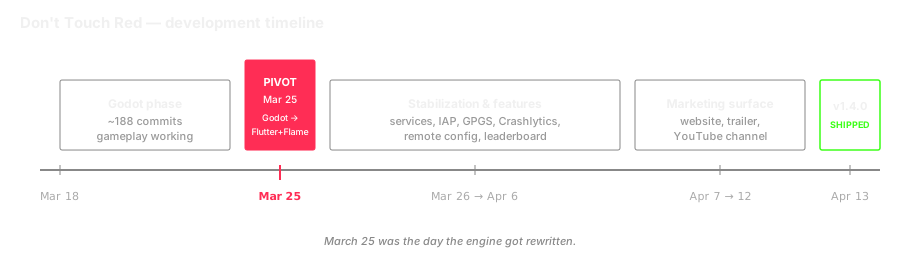
Claude Code did a lot of the typing on this. The skills are part of how I kept the project productive enough to actually finish.
A note on framing. This isn't an "AI wrote my game for me" post. I'm not interested in writing one of those, and I don't think it would be true. It's a field note from a backend engineer figuring out AI tooling on a side project. Some of it worked, some of it didn't. The README in production is still the default flutter create placeholder, which should set the right expectations.
What shipped
Don't Touch Red is a hyper-casual Android color-dodge game. A ball auto-rises through spinning rings; you tap to cycle the ball's color; if it touches a ring segment of the wrong color, you die. The death-to-restart loop is targeted at under 500 ms on a Snapdragon 450. That number ends up mattering more than you'd think, and I'll come back to it.
The stack:
- Flutter for the app shell, menus, store, settings, leaderboard
- Flame 1.37 for the in-game world (game loop, components, collision)
- Riverpod for UI state, get_it for service location, a plain
ChangeNotifier-based state machine for the game loop - Firebase for anonymous auth, cloud leaderboard, Crashlytics, Remote Config (which I use for hot-tuning difficulty without a release)
- Google Mobile Ads for interstitials and rewarded ads, in_app_purchase for theme unlocks, games_services for GPGS sign-in and achievements
I'm a Java / Kotlin / Spring engineer by day. The obvious choice was native Kotlin. I picked Flutter + Flame instead because the iOS port (if I ever get to it) is essentially free, and because the perf on Flame for a simple 2D game is genuinely fine. The decision came out of a few hours of web research, not a strong opinion. That's a theme.
The Godot pivot
The repo started in Godot 4.6. The first 188 commits are GDScript, and the gameplay actually worked. Then on March 25, this commit happened:
02ee038 — chore: complete Godot cleanup — Flutter/Flame is now the only engineThat commit is preceded by a wall of chore: remove Godot ... commits all stamped the same day, and followed by a stretch of Flutter feature work that includes all 11 services, the full UI redesign, and the entire perf optimisation pass.
So why throw away 188 commits?
Godot was fine for the gameplay. The problem was everything else. The menus. The settings screen. The leaderboard layout. The store. The little overlays. Godot's UI tooling for Android, as is widely documented, is not great. You can fight it, but the result still looks like a game made in Godot by someone who fought it. I tried. It looked like a game made in Godot by someone who'd fought it.
The realisation was that I was going to spend the next two weeks of the project on UI, and Godot was going to be the thing standing between me and a polished release. So the rewrite happened.
What survived: the design, the feel, the level data (the first 100 levels are still the same hand-curated arrays they were in GDScript, just translated to Dart), and the save-file format (still uses the section names from the Godot version, kept for compatibility with no users I had).
What didn't: the shaders, the scene tree, every line of GDScript.
I don't think I'd have made the same call without Claude Code. The cost of re-implementing the working parts in a new stack was small enough that the math worked out. Without it, I'd probably have spent another few weeks fighting Godot's UI and shipped something I wasn't proud of.
The workflow stack
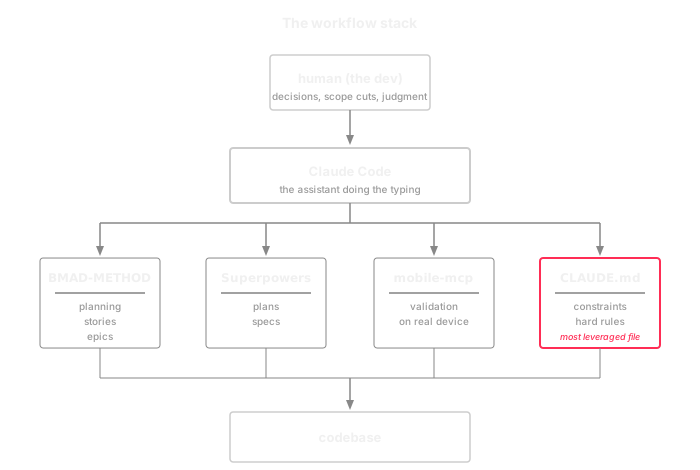
I'm not particularly fast at typing, so the volume of work that went into the build came from the stack of tools and processes underneath. Briefly:
- BMAD-METHOD for the planning surface: Game Design Document, architecture, epics, story breakdowns. Each implemented story gets its own markdown file with a stable ID, and the story IDs map directly onto the early commit messages. (I tried Agent OS as an alternative at one point. It didn't fit my project the way BMAD did.)

- Superpowers skill suite for plans and specifications.
- mobile-mcp for feature validation. Every feature is exercised on an actual emulator (or my physical device) before being marked done. Unit tests are not enough.
And a CLAUDE.md at the repo root that codifies the hard rules. Some of mine:
- Never mutate game state directly. Use the transition method.
- All debug prints behind a debug-mode guard. None on the death/restart path.
- UI layer never contains game logic. UI reads state through Riverpod only.
- Game layer never imports the UI layer. One-way dependency.
- No object allocation on the death path. Pre-allocate pools at load time.
- Prefer Canvas primitives (drawArc, drawCircle) over drawPath with manual polygons.
- Fix ALL bugs encountered. Pre-existing or not. If you see it, fix it.
- All tests must pass. 0 failures before marking work complete.
Em dashes got banned a few weeks in. They were appearing in every Claude-generated piece of text I touched, including user-facing strings, and I'd had enough.
If I had to pick one thing that mattered most across the whole build, it would be CLAUDE.md. It sets the constraints inside which the assistant operates. A vague CLAUDE.md produces vague output. A CLAUDE.md that names the death path as a hot region and forbids allocations on it produces code that doesn't allocate on the death path. Specific rules end up in the diff.
The two skills
After the second or third project where I caught myself typing variants of "please make a checklist of everything I still have to do for the Play Store launch, walk through what's actually in the codebase, check current Play Console rules, and group it by severity", I gave up and wrote a skill.
That's android-go-live-checklist. A few weeks later, after I caught myself doing the same recurring prompt for "please review this implementation plan against the actual codebase and current Android best practices", I wrote android-plan-reviewer. Both are public, packaged as a Claude Code marketplace plugin, and linked at the bottom of this post.
A prompt is a one-off. A skill is a contract you write once and the model honours thereafter. When you have a workflow you keep typing variations of, the prompt is no longer the right unit of reuse. Three things in particular got easier when I crossed that line.
First, defensive behaviour up front. Both skills exit immediately if the working directory isn't an Android project. I didn't put that in the first version. I put it in after Claude Code cheerfully started generating an Android Play Store checklist for a Spring Boot service I'd accidentally invoked it in. The early-exit gate is now the second step in both skills.
Second, web research is part of the workflow. Any skill that touches a fast-moving platform (Android SDK levels, Play Console policy, Billing Library versions) has to do live web research, because training data is months stale on those. Both skills have explicit web research steps. The plan-reviewer's reviewer agents specifically check things like "is the Billing Library version this plan assumes still supported by new submissions" against developer.android.com.
Third, structured output. The plan-reviewer's per-issue output is a fixed shape:
ISSUE:
- Section: ...
- Location: "<exact quote from the plan>"
- Problem: ...
- Correction: "<replacement text>"
- Source: <URL or file path>
- Severity: critical | important | suggestion
That structure is what makes the loop work. The skill's outer logic can parse the issues, apply inline corrections to the plan file, and decide whether another pass is warranted, all because the agent always returns issues in the same shape.
The plan-reviewer is the more ambitious of the two. Its design:
- Detect the section structure of the plan (markdown headers, numbered sections, bold-text headings, mixed).
- Spawn one general-purpose sub-agent per section, in batches of ten so the system doesn't drown. Each sub-agent reviews its section's claims against the actual codebase and against current Android guidance from the web.
- Collect all issues. Apply inline corrections to the plan file with
[Reviewed: ...]annotations explaining why and citing sources. - Loop. Up to three passes by default, or
infiniteif I ask for it. Each pass might surface issues that the previous pass's corrections introduced. - Stop when a pass returns zero issues, or when the iteration cap is hit.
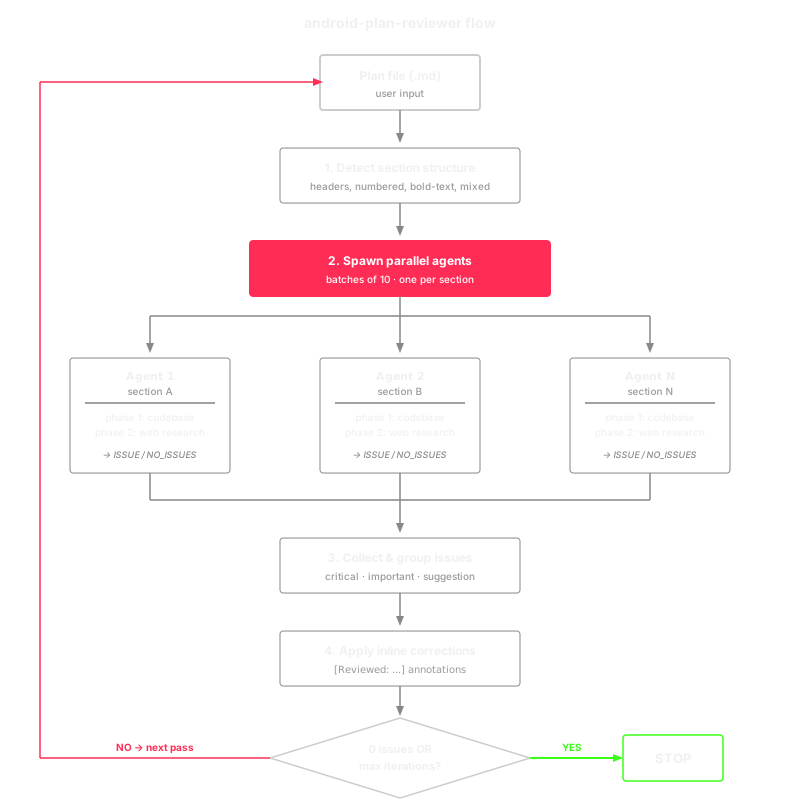
This grew out of use, not from clean-sheet design. The first version was a single agent doing one pass. It missed things. The second was sequential per-section. It was slow. Parallel-per-section with a clamp emerged from "let me just try ten at once and see if it's faster", and it was, dramatically. The iterative loop came from finding that corrections applied in pass one occasionally introduced new inconsistencies that needed pass two to catch.
A small meta note. I wrote the skills using Claude Code's own skill-creator skill. So the workflow was: Claude Code helps me build a thing, I notice I'm repeating myself, I use a Claude Code skill to ask Claude Code to write a Claude Code skill. The recursion was not lost on me.
Why publish them. Two reasons. The selfish one is that having them in a marketplace plugin means I can /plugin install into any new project I start, instead of finding them in some old repo and copying files around. The less selfish one is that someone else might find them useful. They're MIT, take what's helpful.
Bits and pieces
A few details from the build that don't fit anywhere else.
Per-frame allocations. There's a stretch of commits on March 25 (the same day as the Godot rewrite) that all do the same thing: eliminate per-frame heap allocations. Each one names the exact site: a particle effect, a ring renderer, a background drawer, a trail behind the ball, the scanning sweep on tier transitions. The reason is that the death-to-restart loop has a 500 ms budget on a Snapdragon 450, and a Snapdragon 450 will GC-pause for longer than that if you allocate a fresh Vector2 per frame in the wrong place. The fix is unglamorous: pre-allocate a reusable position vector at load time, then use Flame's in-place mutators instead of allocating new Vector2() instances each frame. It came out of staring at a profiler, and it ended up codified as one of the rules in CLAUDE.md.
kotlin.incremental=false. There's a line in the Android Gradle config that disables incremental Kotlin compilation. The comment is the most defeated line in the repo: "avoids cross-drive cache failure on Windows (Pub cache on C:, project on F:, Kotlin incremental store can't reconcile different roots)". This is the most "I gave up arguing with the toolchain" line in the codebase. It is also a perfectly good fix.
The AudioPool fix. A commit titled fix: replace FlameAudio.play() with AudioPool to eliminate Android Binder timeout. The bug surfaced as the game audio cutting out and the system logcat lighting up with Binder timeout errors. The cause was that on rapid-fire SFX (which is the entire game), the audio API was creating short-lived service connections faster than Android's Binder could close them. Pooling fixed it. That kind of OS-level error reaching the surface through a game audio API is the sort of detail you only learn by shipping.
Keystore key-not-found. The save file is encrypted with a per-install passphrase. Originally that passphrase lived in Android Keystore, which mostly worked but produced a lot of KEY_NOT_FOUND log noise on certain device configurations. Migration to flutter_secure_storage (which uses EncryptedSharedPreferences) made the noise go away. The migration shipped before any user noticed.
The README. Don't Touch Red is on the Play Store, with a website, a trailer, and a YouTube channel. The README in the repo, in production, today, is the default flutter create placeholder. The body, in its entirety, is "A new Flutter project."
That's my favourite detail of the build, and I left it there on purpose.
What didn't get done
A list of things I cut, didn't do, or did badly:
- No iOS build. The iOS scaffolding exists from
flutter create. There is no signing, no App Store work, no commit history for it. The choice of Flutter was partly to keep that door open. I didn't walk through it. - No CI. There's a GitHub workflow folder, but no actual workflow lives in it. Releases are a PowerShell command list inside
CLAUDE.md. - No automated end-to-end tests for the death flow. There's an integration test for restart latency. There are unit tests for the state machine and most services. The actual death sequence (collision → freeze → ad → overlay → restart) is validated manually via mobile-mcp on an emulator.
- No localisation. Every string is hardcoded English in Dart. No ARB files, no
intl. - No FCM. A pre-spike doc for it exists. The manifest pre-declares
POST_NOTIFICATIONS. Nothing is wired. - No accessibility audit beyond a colorblind mode.
- Two doc files at the repo root still reference the dead Godot stack. Nobody updated them. They still tell readers to install Godot 4.4 build templates.
AI tooling did not fix discipline problems for me. It did not turn me into a small studio. What it did was shift where the bottlenecks were. The bottleneck wasn't typing speed. It was deciding what not to do, and validating that what I had built was actually working.
What stuck with me
A few things I want to remember next time.
- Skills paid off when I caught myself repeating prompts. The point where I noticed I was typing a variant of an instruction for the third time was usually the point where it was worth writing a skill instead.
- Live web research mattered more than I expected. Training data ages out fast on Android. Both skills do live research before producing anything, and it's the difference between a checklist that says
targetSdk 31(the model's prior) and one that saystargetSdk 36, with notes about the August 2026 deadline(the actual current rule). - A real workflow underneath made a difference. A defined dev loop, structured stories, an explicit feature-validation gate on a real device. Without scaffolding like this, a project this size would have collapsed into a directionless mess of commits.
CLAUDE.mdcarried more weight than I expected. Specific rules ended up in the diff. Vague ones didn't. It's worth treating like a contract you're writing with the assistant.- Scope cuts are still scope cuts. No iOS, no CI, no localisation, default README. Pick your placeholders carefully.
Close
Don't Touch Red is on the Play Store at donttouchred.com. Free to play. Tap to cycle the ball's color. The rings do the rest.
The two Claude Code skills are at github.com/calvin-iyer/android-skills. MIT licence, install via the Claude Code marketplace.
Publishing on the Play Store has been in the back of my mind for years. Now it isn't.